Isolate one thing, grade only that
Qualifier
Point at a color and pull it out of the image — a precise key by hue, saturation, and luminance — so your next move touches only the sky, the shirt, the skin, and nothing else. The qualifier is how a grade gets surgical.
Isolate, then grade
Key a precise hue, saturation, and luminance range — then adjust only those pixels.
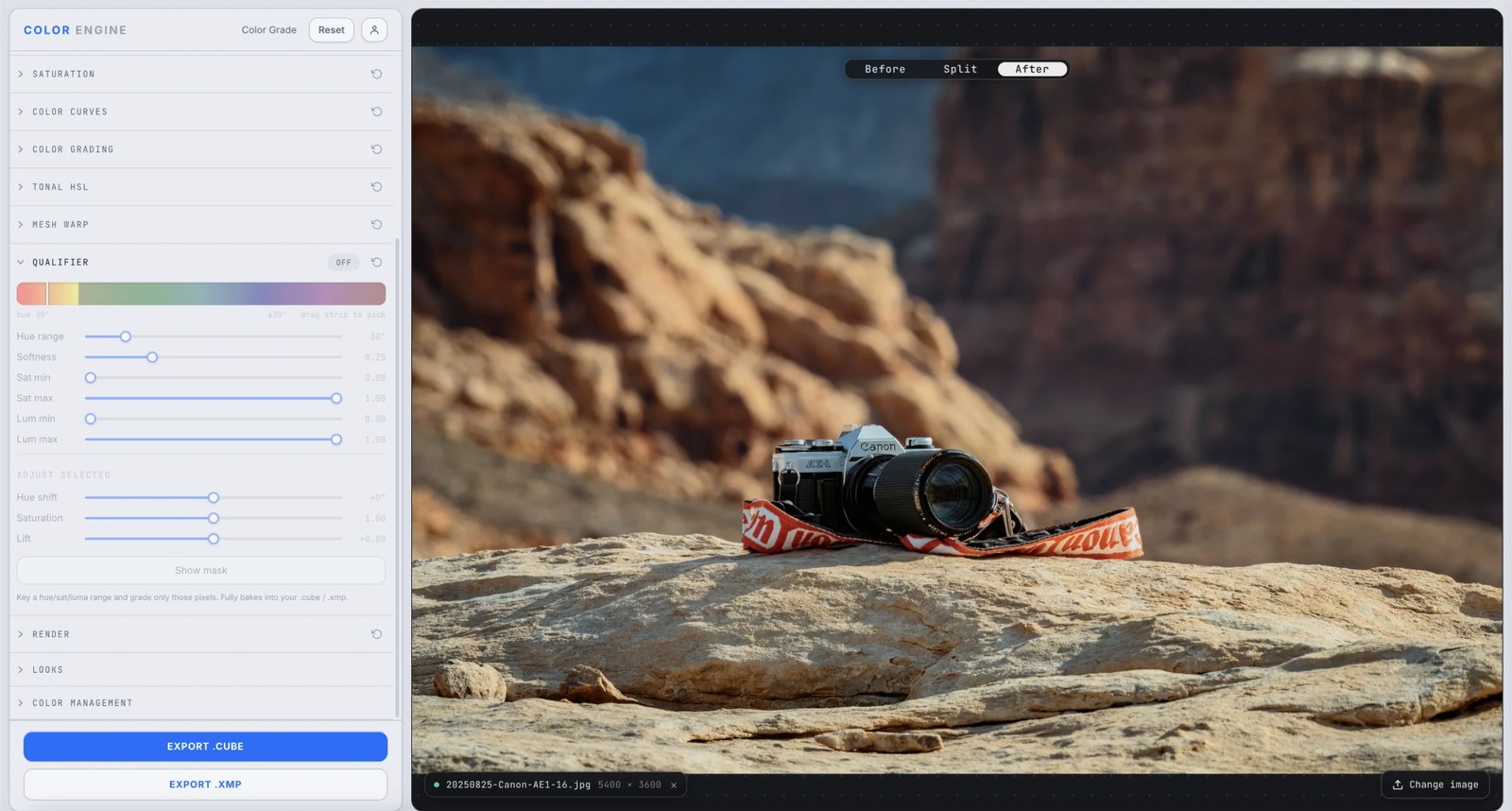
What it is
A qualifier keys a precise slice of the image by hue, saturation, and luminance — then masks every adjustment to just that selection. Pick the sky and only the sky moves; pick the skin and the rest of the frame stays put.
It's the secondary tool: where Tonal HSL nudges broad color families, the qualifier isolates one exact thing — a specific blue, a single shirt, a narrow range of skin — for targeted correction.
The controls
Hue strip + Hue range
Drag the hue strip to pick your target color, then set Hue range — how wide a slice of hues around it to grab (± degrees).
Softness
Feathers the edge of the key so the selection blends in instead of cutting a hard, jagged line.
Sat min / Sat max
Bracket the saturation band — reject washed-out or oversaturated pixels that share the hue but aren't your target.
Lum min / Lum max
Bracket the brightness band — the move that separates a bright sky from a blue shadow that share the same hue.
Adjust Selected — Hue shift / Saturation / Lift
The grade applied to only the keyed pixels: rotate their hue, push or pull their saturation, and lift their level.
Show mask
Displays the selection as a black-and-white matte, so you see exactly what you've keyed before you touch a slider.
What to do with it
Where Color Match earns its place in a real grade.
Pull a sky and deepen it
Key the blue, drop its luminance and lift its saturation — a dramatic sky without masking the mountains below it.
Fix one problem color
Isolate a shirt or a sign that's fighting the frame and correct it without touching anything else.
Grade skin on its own
Key skin tones and refine them in isolation — warmth, saturation, evenness — while the background stays as graded.
Relight by selection
Key the highlights on a subject and lift them, or key the shadows and open them, for a targeted relight.
Field tips
- Hit Show mask first — get a clean black-and-white selection before you make a single adjustment.
- Add Softness until the edges stop looking cut out; a hard key reads as a mask, a soft one reads as a grade.
- Narrow the Sat and Lum min/max to reject look-alikes — it's how you separate two things that share a hue.
The science
The part nobody else explains
A key is a mask built from color
The qualifier turns 'this hue, this saturation, this brightness' into a grayscale matte — white where the pixel matches, black where it doesn't, grey at the edges. Every adjustment then multiplies through that matte, so only the selection moves.
Why hue, saturation, AND luminance
One axis isn't enough — a bright sky and a blue shadow can share a hue but differ in brightness. Keying on all three lets you grab the exact thing and reject its look-alikes.
Softness is everything
A hard-edged key betrays itself — the eye catches the cut line instantly. Feathering the matte's edges is what makes a secondary correction invisible; it's the difference between a grade and a cut-out.
Qualifier vs Tonal HSL
Tonal HSL adjusts a fixed color band across the whole frame, fast and broad. The qualifier keys a precise range you define and masks to it — slower, surgical. Reach for HSL to shape color families; reach for the qualifier to isolate one exact thing.
It survives the export
Many secondary corrections live only inside the app that made them. Color Engine's qualifier bakes its keyed grade straight into the exported .cube LUT and .xmp profile — the isolation travels with the file into Resolve, Premiere, or Lightroom.
Frequently asked
Qualifier vs Tonal HSL — which do I use?
Tonal HSL for quick, broad shifts to a whole color family; the qualifier when you need to isolate one specific range and mask to it precisely.
My key looks jagged — how do I fix it?
Raise Softness to feather the edge, and tighten the Sat/Lum min–max so you're only grabbing your target. Check the result with Show mask.
Can I grade only skin?
Yes — key skin by hue, then bracket its Sat and Lum, feather the edge with Softness, and adjust in isolation while the rest of the frame stays put.
Related features
Try Qualifier on your own shot
Build a look, match it across a set, and export a LUT or preset in minutes — free for 14 days, no installs.