Per-hue color, split by tone
Tonal HSL
Bend the Hue, Saturation, or Luminance of any color you point at — and do it separately in the shadows and the highlights. A blue sky and a blue shadow can go two different ways, no masks required.
Per-hue, split by tone
Hue, Saturation, and Luminance per color — separately in the shadows and the highlights.
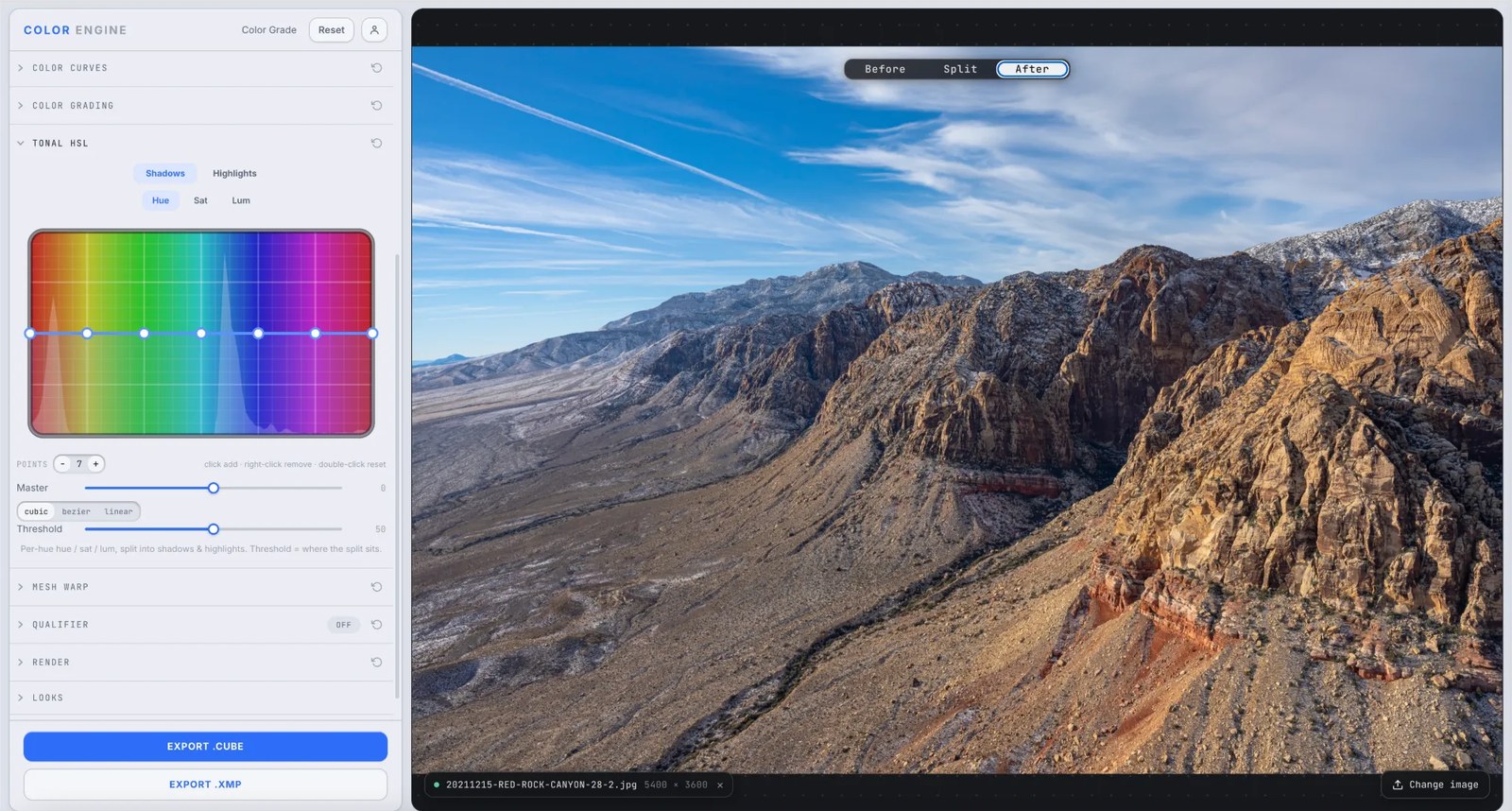
What it is
Tonal HSL is a per-hue curve for Hue, Saturation, and Luminance — drop a point on the spectrum and drag to shift, mute, or brighten one color while the rest hold. No fixed eight bands; a continuous curve you shape exactly where you need it.
Its twist is in the name: every adjustment splits into Shadows and Highlights, with a Threshold that sets where that split sits. So you can cool the blues in the shadows and warm them in the highlights independently — split-toning by hue and tone at once.
The controls
Shadows / Highlights
The tonal half you're shaping. Each hue can move one way in the shadows and another in the highlights.
Hue / Sat / Lum
Which property the curve bends — shift the color, change its intensity, or change its brightness.
Per-hue curve
Drop points along the spectrum and drag to target one color or a smooth range — click to add, right-click to remove, double-click to reset.
Threshold
Sets where shadows end and highlights begin — slide it to decide which tones each adjustment owns.
Master & interpolation
A Master amount scales the whole curve; cubic, bezier, or linear sets how it bends between points.
What to do with it
Where Color Match earns its place in a real grade.
Split-tone by hue
Cool the blues in the shadows and warm them in the highlights — a teal-and-orange look targeted to a single color.
Deepen a sky, keep the foreground
Drop the blues' luminance in the highlights where the sky lives, and leave the shadowed rock untouched.
Fix lit skin only
Nudge the oranges in the highlights for sunlit faces without shifting the color down in the shadows.
Kill a distraction
Desaturate one hue, in just the tonal zone where it's shouting, and the eye settles where you want it.
Field tips
- Set the Threshold first — it decides which tones your shadow and highlight moves actually touch.
- Go gentle on luminance for skies; big pushes on a narrow hue reveal banding in the gradients.
The science
The part nobody else explains
HSL, split by tone
Plain HSL asks three questions of a color — what hue, how saturated, how bright. Tonal HSL asks them twice: once for the shadows, once for the highlights. That's what lets a single hue read two different ways depending on where it falls on the tonal scale.
The threshold is the dividing line
Shadows and highlights aren't fixed zones — the Threshold sets where one ends and the other begins. Move it to hand more of the midtones to the shadow side or the highlight side, tuning which pixels each adjustment owns.
Why a per-hue curve beats fixed bands
Eight fixed sliders force your target into the nearest bucket. A continuous curve lets you place a point on the exact hue that's wrong and feather the falloff yourself — narrower or broader, your call.
Tonal HSL vs the Qualifier
Tonal HSL shapes a hue across the frame, split by tone; a qualifier keys a precise hue/sat/luma range and masks to it. Reach for Tonal HSL for fast, broad, tone-aware color — a qualifier when you need to isolate one exact thing.
Frequently asked
What makes this different from plain HSL?
The tonal split. Every per-hue Hue/Sat/Lum move is set separately for shadows and highlights, with a Threshold deciding where the split falls — so one color can go two ways by brightness.
What does the Threshold do?
It sets where shadows end and highlights begin. Slide it to control which tones your shadow and highlight adjustments actually affect.
Tonal HSL or the Qualifier?
Tonal HSL for fast, broad, tone-aware shifts to a color across the frame; the Qualifier when you need to isolate one specific range and mask it precisely.
Related features
Try Tonal HSL on your own shot
Build a look, match it across a set, and export a LUT or preset in minutes — free for 14 days, no installs.